


Phone Tracker By Number
4.310.39K Reviews
App Specs
- Version
- 7.34
- Updated On
- License
- Free
- Downloads
- 50,000,000+
- Developer
- Family Locator inc
- Categories
- Maps & Navigation
- Platform
- Android, iOS
Screenshots
 Analysis by AppCompare
I find phone-location apps make the most sense when everyone involved agrees on what the sharing is for. A family member heading home late, a parent checking that a child arrived, or a friend coordinating a pickup are practical reasons to share a location; trying to follow someone without their knowledge is not. Phone Tracker by Number is aimed at that kind of connection, but the useful part is not simply seeing a marker on a map. It is setting up a clear, shared routine so nobody has to keep sending “Where are you?” messages.
That distinction shapes how I would use it. Before adding anyone, I would agree on who can see whose location, when checking is appropriate, and how to pause sharing when it is no longer needed. A location app can make coordination easier, but it can also feel intrusive if the group has not talked about boundaries. I would treat consent as part of setup, not as a box to tick and forget.
Start with a shared purpose
A good first use is narrow: perhaps two family members want to know when each other is close to a meeting point, or a parent and teenager want a simple way to confirm arrival after an evening activity. Starting with one clear purpose makes it easier to decide whether location sharing is actually helpful. It also avoids turning a safety tool into a habit of checking every movement.
Guides and Analysis on Phone Tracker By Number
Phone Tracker by Number is a free Maps & Navigation app from Family Locator Inc. It has a 4.3 average from around one million ratings, and it has passed fifty million installs. Those figures suggest that location sharing is familiar to a large audience, but they do not tell me whether it suits every household. The important question is whether the people you want to coordinate with are comfortable joining the same arrangement.
Set up the handoff, not just the map
The workflow starts with a phone number sign-up and the permissions needed for location access. I would take a moment to review the phone’s location settings and make sure the people involved understand what sharing means in practice. If the app is meant to help with a school pickup, for example, everyone should know who is checking and what to do if a location does not appear as expected. A map is useful only when the group has a sensible plan for interpreting it.
There is also a practical handoff between the person sharing and the person checking. One person has to allow the location to be shared; another needs to know how to find it in the app. That makes this a poor fit for secret tracking or for someone who expects a phone number alone to reveal another person’s whereabouts. I would use it as a mutual coordination tool, with clear agreement, rather than as a way to investigate someone.
What a normal day might look like
Imagine a parent is waiting to collect a teenager after an activity. Instead of repeatedly calling, the parent can check the shared location and time the pickup more sensibly. If the teenager is still at the venue, there is no need to interrupt; if they are on the way, both people have a better idea of when to meet. The value here is less about surveillance than reducing unnecessary messages and uncertainty.
Worth Reading Before You Choose

Basketball Stars: Multiplayer Is Fast, but Can It Recover When Matches Go Wrong?

WEBTOON Turns Phone Updates Into a Better Reading Routine

Link to Windows Runs on Shared Habits, Not Social Feeds

How Alibaba.com Dominates the B2B Marketplace

Metro's Quiet Rise: Redefining Mobile Communication

Why Amazon Alexa Is Becoming the Household Layer for Smart Homes
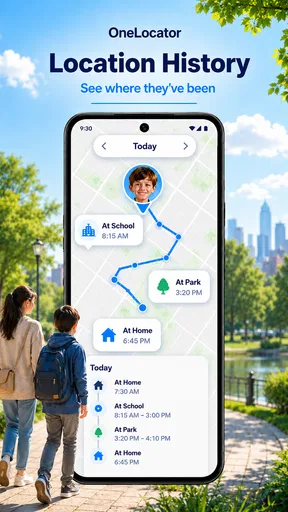
Location history can add context when a live check is not enough, such as reviewing the day’s route together after plans changed. I would use that carefully and discuss it openly, especially with older children and adults. History can help answer a practical question, but routinely auditing someone’s movements can damage trust. The feature is most useful when it supports a specific conversation, not when it becomes a substitute for one.
Getting Started with Phone Tracker by Number
Upon launching the app, you're greeted with a straightforward interface that’s refreshingly easy to navigate. No complicated settings or overwhelming options—just a simple, clean design that gets straight to the point. The app requires you to sign up using your phone number. Once that's done, you can start tracking.
The setup process is a breeze. You just need to grant the necessary permissions, and you’re good to go. For the tech-savvy folks out there, the app uses GPS technology to pinpoint locations accurately. And for those who aren’t so tech-inclined, don’t worry—the app handles everything seamlessly in the background.
Features That Stand Out
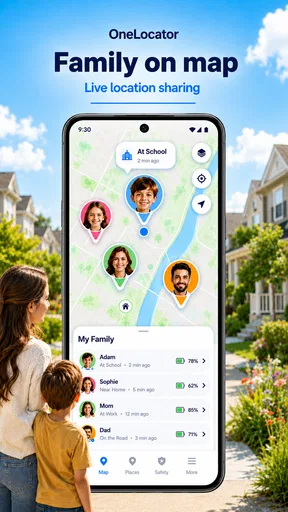
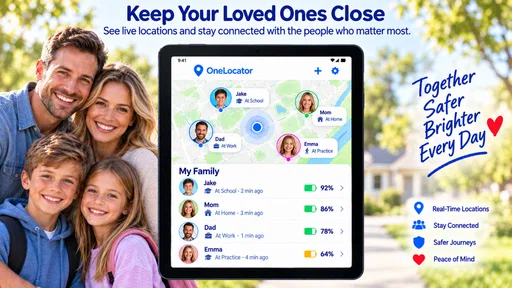
What really caught my attention are the features packed into Phone Tracker by Number. It allows you to track the real-time location of family members or close friends with their consent, of course.
Real-Time Tracking: This is the bread and butter of the app. You can see the exact location of the person you're tracking, updated in real-time. It’s incredibly precise, which is a huge relief if you're prone to worrying.
Location History: Another nifty feature is the location history. You can check where your loved ones have been throughout the day. This can be super useful for parents wanting to keep an eye on their kids' whereabouts.
User-Friendly Interface: As I mentioned earlier, the interface is clean and intuitive. Even if you’re not great with tech, you’ll find it easy to use. The developers have done a stellar job in keeping everything user-friendly.
Why It Might Be Worth the Download
Now, let's talk about why you might want to download this app. First off, if safety and peace of mind are your top priorities, this app delivers. Whether it’s ensuring your kids are safe or just keeping track of your elderly parents, it’s a tool that offers reassurance.
Moreover, the app keeps everything private. You have full control over who can see your location, and you can easily turn off location sharing whenever you want. The emphasis on privacy is a big thumbs-up in my book.
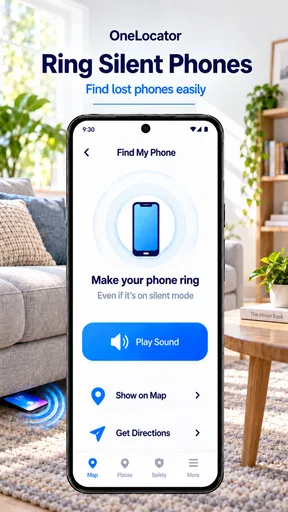
And let's not forget the practical uses. Ever lost your phone and wished you could track it down? With this app, you can easily locate your device, saving you a lot of stress and potential expense.
Where expectations need a reality check
Location is not a perfect substitute for a phone call or a direct message. A dot on a map can be delayed, imprecise, or hard to interpret when someone is indoors, travelling through a dense area, or has limited connectivity. I would treat it as a helpful indication rather than proof that somebody is exactly at a particular door or has safely completed a journey. If a situation is urgent, contact the person or use the appropriate local emergency service rather than relying on a map refresh.
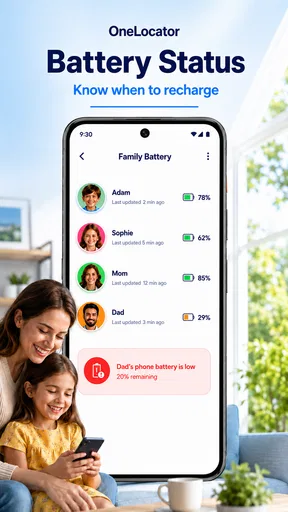
Battery and connectivity are worth considering too. Location sharing depends on the phone being available and able to report its position; a powered-off device or a weak signal can leave you with an old view. That is why I would agree on a backup plan in advance: a short text on arrival, a call if the map seems stale, or a known meeting point. This small step prevents a routine delay from turning into unnecessary alarm.
Choosing it over the usual alternatives
Compared with sending a one-off location pin in a messaging app, a dedicated family locator is better suited to repeated coordination among people who have agreed to share. A pin is often enough when meeting a friend once; an ongoing arrangement can be more convenient for a household with regular pickups or commutes. On the other hand, if you only need directions, a standard navigation app is the better tool, and if you simply want to tell someone you have arrived, a message may be less intrusive.
Phone Tracker by Number is also not a replacement for a full conversation about safety. It cannot tell you why someone has stopped moving or whether a detour is harmless. I would avoid choosing it if the other person does not want location sharing, if the group needs detailed route planning, or if the main need is managing a lost device through the phone’s built-in account tools. Those alternatives may fit the task more directly.
Costs, compatibility, and choosing a routine
The app is free to download, with in-app purchases ranging from $3.99 to $42.99 per item. I would begin with the free experience and decide whether any paid option is worth considering only after identifying a specific need. Before paying, check the purchase details shown in the app and make sure the feature solves a problem your group actually has; a subscription or add-on is not automatically useful just because location sharing is.
It is rated for Everyone, and the current version is 6.87, with Android 6.0 as the minimum operating-system requirement. Those details help with basic suitability, but I would still check that each person’s phone can install and run the app before building a routine around it. If one family member cannot participate, the group may be better served by a method everyone already has access to.
For a smoother everyday workflow, I would keep the circle small, agree on a few ordinary occasions when checking is useful, and revisit the arrangement if someone’s needs change. A child’s routine, an older relative’s comfort level, and an adult’s commute are not the same problem. Keeping the purpose specific makes it easier to notice when location sharing is helping—and when a quick call would be kinder and clearer.
The Verdict
All in all, Phone Tracker by Number is one of those apps that you don’t realize you need until you start using it. It’s practical, reliable, and offers peace of mind, which is something we could all use a little more of these days. Whether you’re a concerned parent, someone who misplaces their phone a lot, or just someone who likes to stay connected with loved ones, this app is worth giving a shot.
So, if you’re on the lookout for a simple yet effective tracking app, head over to your app store and check it out. You might just find it becomes a staple on your phone.
Who I think will get the most from it
I would recommend trying it if you have a small group of family members or close friends who already want an easy way to coordinate arrivals and check-ins. Parents arranging pickups, relatives helping one another with regular outings, and people who often meet after separate commutes are the clearest fits. The benefit is greatest when sharing is mutual, expectations are simple, and nobody needs to keep asking for updates.
I would skip it if you want to track a person without their agreement, if a one-time location share already covers your needs, or if you mainly need turn-by-turn directions. It is also not my first choice for someone who finds continuous location sharing stressful. In that case, occasional texts or a planned check-in can provide reassurance without keeping a map open in the background.
A practical way to decide
Before making it part of your routine, try one ordinary outing with the people who will use it. Agree on the purpose, confirm everyone can see the expected shared location, and decide what you will do if the view appears out of date. Then ask whether the app actually reduced calls or confusion. If it did, keep the arrangement; if it added tension or did not fit the situation, switch to a simpler check-in.
That is the standard I would use for any location tool: it should make a real handoff easier without making the people involved feel watched. Used with consent and sensible limits, this app can be a convenient part of family coordination. Used as a substitute for trust, communication, or emergency help, it is the wrong tool.
Pros
- Accurate location tracking.
- User-friendly interface.
- Works without internet.
- Real-time updates.
- Battery-efficient.
Cons
- Limited free features.
- Requires GPS always on.
- Ads can be intrusive.
- Privacy concerns.
- May not work indoors.
FAQs for Phone Tracker By Number
How accurate is Phone Tracker by Number in locating a device?
Phone Tracker by Number provides highly accurate location tracking using GPS technology. It can pinpoint a device’s location within a few meters. However, accuracy may vary in areas with poor GPS signals, such as dense urban environments or remote locations. Always ensure your device's location services are enabled for optimal performance.
Is Phone Tracker by Number safe to use in terms of privacy?
Yes, Phone Tracker by Number prioritizes user privacy and security. The app requires consent from the person being tracked, ensuring ethical use. It employs strong encryption to protect data transmission, keeping your location data secure from unauthorized access. Always review the app’s privacy policy for detailed information.
Does the app work internationally?
Phone Tracker by Number is designed to function globally as long as the device being tracked has an active internet connection. However, users should be aware of potential roaming charges when using the app in different countries. Check with your mobile provider for specific details about international data usage.
Can I track multiple devices with Phone Tracker by Number?
Yes, Phone Tracker by Number allows users to track multiple devices from a single account. This feature is particularly useful for families or businesses needing to monitor several individuals. Users can add devices by entering their phone numbers and ensuring they have given the necessary permissions for tracking.
What are the subscription costs for Phone Tracker by Number?
Phone Tracker by Number offers a range of subscription plans to suit different needs, including monthly and yearly options. While the app may offer a free trial, access to premium features typically requires a subscription. Pricing details can vary, so it’s advisable to check the latest information on their official website or app store listing.


